---
title: Instant Vacancy Pages
description: Our Instant Vacancy Pages are a great way for you to cut down recruitment time. There’s no need to hire a web developer or a designer with this option – we create you a page for your website.
---
[Skip to content](https://helpdesk.chameleoni.com/hc/en-us/articles/360000785277-instant-vacancy-pages#main-content)
English - United Kingdom
Show submenu for translations
[More support](https://helpdesk.chameleoni.com/kb-tickets/new?hsLang=en-gb)
[](https://www.chameleoni.com/)
- [Book your training here](https://www.chameleoni.com/free-training/focused-training-sessions/)
- [Privacy Policy](https://www.chameleoni.com/privacy-notice/)
- [SAAS Conditions](https://www.chameleoni.com/chameleoni-saas-conditions/)
- [Report an issue](https://share-eu1.hsforms.com/1dTLPjz74Qna3uDJ4qmdxBw2dydlh)
Open main navigation
Close main navigation
- [Book your training here](https://www.chameleoni.com/free-training/focused-training-sessions/)
- [Privacy Policy](https://www.chameleoni.com/privacy-notice/)
- [SAAS Conditions](https://www.chameleoni.com/chameleoni-saas-conditions/)
- [Report an issue](https://share-eu1.hsforms.com/1dTLPjz74Qna3uDJ4qmdxBw2dydlh)
- English - United Kingdom
Show submenu for translations
- [More support](https://helpdesk.chameleoni.com/kb-tickets/new)
- [Contact us](mailto:support@chameleoni.com)
[Contact us](mailto:support@chameleoni.com)
How can we help you today?
- There are no suggestions because the search field is empty.
1. [Chameleon-i Knowledge Base](https://helpdesk.chameleoni.com/?hsLang=en-gb)
2. [Website Integrations](https://helpdesk.chameleoni.com/website-integrations?hsLang=en-gb)
# Instant Vacancy Pages
## Our Instant Vacancy Pages are a great way for you to cut down recruitment time. There’s no need to hire a web developer or a designer with this option – we create you a page for your website.
**Instant Vacancy Pages** allow you to have a stylish page to fit any agency website, including your logo, editable colour, and search fields powered by tags. With no extra work, you can improve your website and make it looks more professional. It takes just **one click to load your vacancies** to the **Instant Vacancy Page**.
To post your jobs to the vacancy pages you need to tick the ‘**Load to website**’ checkbox in the vacancy posting tab. Once loaded, your vacancy information will be listed on your page, ready for candidates to apply, with applications going to the vacancy owner via email.
When a user registers and applies for a job on your website, a record is automatically created onto the database with the record then being placed onto the shortlist for the respective vacancy. Vacancy owners can get alerts to inform them when they have received an application. You can also create a basket that auto-populates with all registrations via the website.
Benefits:
- Post your jobs online today
- No complicated integrations
We will provide you/your web developer with an URL for the page. You then link it to your website via a button or text link.
When viewing the page:
- The logo will be taken from the logo uploaded to the admin section in Chameleon-i.
- The search criteria are powered by Tags which you can add/edit/delete in the Tag section in Chameleon-i Admin. To do this you will need to login to Chameleon-i
- Go to Tags Tab in Admin
- Create Tier 1 tags - Here is an article on how to create tags: [https://supportcentre.chameleoni.com/hc/en-us/articles/201242561-How-to-create-a-tag](https://supportcentre.chameleoni.com/hc/en-us/articles/201242561-How-to-create-a-tag)
- Web Location (Town/County) T2=ie LONDON OR SURREY
- Web Expertise (Sector) T2=ie FINANCIAL
- Web Salary (From-To) T2=ie £10,000-£20,000 or £25-£50ph
- You can also edit some of the colour elements on the page. To do this you will need to go to the CMS section in Admin where you will see a template called: Instant Vacancy Pages - Colours. The colours are defined by using hex codes which will look similar to this #000000 - 6 digits preceded by a #.
- To edit the colours go to the Content 1 tab on this page. There are 3 colours you can set.
- Background colour by search
- Search Text
- Vacancy Text
- You need to enter the color hex codes so they display - #FFFFFF;#ffff00;#0000FF - with a semi-colon before each color.
For each vacancy, you will then tag accordingly so that the vacancy will appear for the search results.
**To activate Instant Vacancy Pages:**
- Select '**Admin**' from the main menu.
- Then in the **Company **tab, click the blue **Billing and Account Management** button.
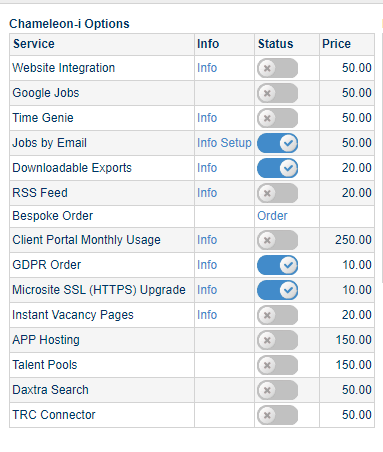
- Then click the blue slider next to Instant Vacancy Pages to order the module.
Once you have confirmed your order a member of our support team will set up your unique link (URL) to your instant vacancy pages and will send you an email with these details and further instructions to complete the setup.
Instant Vacancy Pages cost £20+VAT per Agency per month.
- [Troubleshooting](https://helpdesk.chameleoni.com/troubleshooting?hsLang=en-gb)
- [User Settings](https://helpdesk.chameleoni.com/user-settings?hsLang=en-gb)
- [Emails and Email Settings](https://helpdesk.chameleoni.com/emails-and-email-settings?hsLang=en-gb)
- [Tips and tricks](https://helpdesk.chameleoni.com/tips-and-tricks?hsLang=en-gb)
- [General](https://helpdesk.chameleoni.com/general?hsLang=en-gb)
- [exchange synchronisation](https://helpdesk.chameleoni.com/exchange-synchronisation?hsLang=en-gb#main-content)
- [exchange](https://helpdesk.chameleoni.com/exchange-synchronisation?hsLang=en-gb#exchange)
- [Website Integrations](https://helpdesk.chameleoni.com/website-integrations?hsLang=en-gb)
- [Search in Chameleon-i](https://helpdesk.chameleoni.com/search-in-chameleon-i?hsLang=en-gb)
- [Plugins and Features](https://helpdesk.chameleoni.com/plugins-and-features?hsLang=en-gb)
- [Admin Tab](https://helpdesk.chameleoni.com/admin-tab?hsLang=en-gb)
[](https://www.chameleoni.com/)
AAA
[mailto:support@chameleoni.com](mailto:support@chameleoni.com)
Copyright © 2024, chameleoni.com